
Intensity on demand
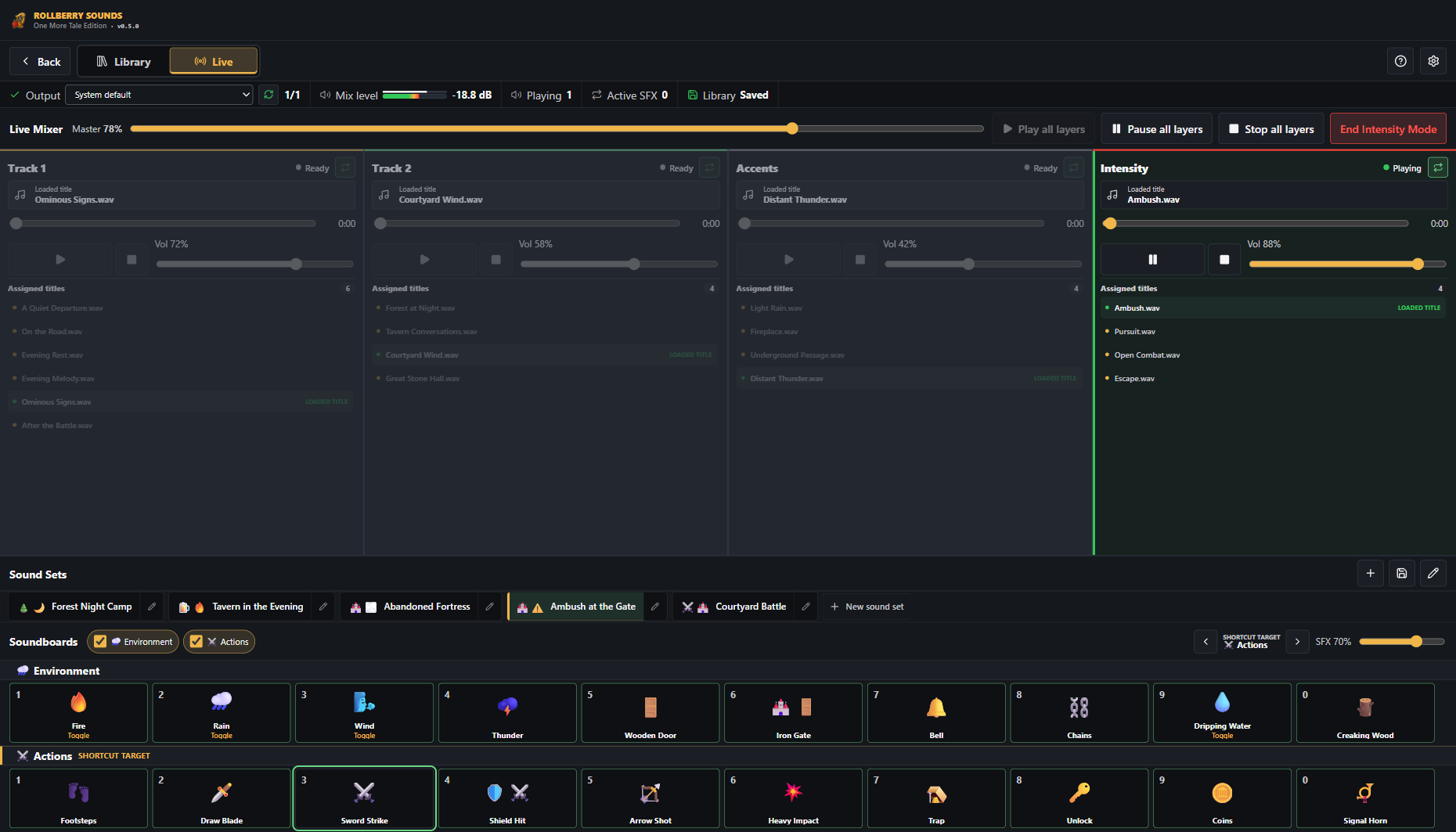
A prepared transition starts combat, pursuit, or escape and pauses selected base layers in a controlled way.
Maps on the projector, fog with one click, soundtrack under control, campaign notes close at hand - locally on your machine. No account, no cloud, no server setup. Just your table and tools that stay in the background.


Kunstfreie Projektaufnahmen mit eigens angelegten Testflächen.
A night at the table
You control everything on your laptop. On the second screen - TV or projector - players only see what they should see. No shared login, no waiting, no loading moment in the middle of play.

Projektaufnahme mit bewusst einfacher, kunstfreier Testfläche.


Product finder
Choose your situation - we show you the right tool.
{{ finderResult.promise }}
Zwei Handgriffe
Open the player window on TV or projector, pull back fog when the party enters a room, and keep sight lines and grid tools to yourself. No player sees more than they should.
Kunstfreie Projektaufnahme mit eigens angelegtem Raum, Wand und Zeichnung.

Music, ambience, and combat run as separate layers. Switch into combat mode, fade in rain, fire a quick sound effect from the soundboard - without falling out of the scene.
Maps, tokens, fog, initiative, audio, and campaign knowledge in one desktop app - built for control at the real table. The individual apps are usable today; RollBerry brings them together step by step.

Eigene App-Aufnahme ohne fremdes Karten- oder Figuren-Artwork.
Why the real table
Because things happen at a real table that no video call captures. The small grin before someone says a foolish idea. The shared breath while the die is still rolling. The hand reaching for chips while the party quietly makes a plan.
Online geht viel davon verloren. Die Verbindung hakt im falschen Moment, alle reden durcheinander oder gar nicht, und man starrt am Ende doch nur wieder auf Kacheln in einem Browser. Es funktioniert – aber es fühlt sich selten nach diesem einen Abend an, von dem man Wochen later noch erzählt.
Mir ist dieser Abend wichtig. Deshalb soll die Technik ihn unterstützen, nicht ersetzen: Karte auf den Beamer, Nebel per Klick, der richtige Track zur richtigen Szene – und dann verschwindet das Werkzeug wieder im Hintergrund. Kein Login, keine Cloud, kein „wer hört mich nicht?". Nur ihr, der Tisch und die Geschichte.
That is exactly what RollBerry is made for. Local, because your table belongs to you - not to a server.

Local-first, meant honestly
No login, no password, no registration. Download the app and start.
Maps, sound, notes, and campaign data live on your machine - not on someone else's server.
No Wi-Fi in the basement? Fine. No server can go down. The session keeps running.
You decide what appears on the projector, what stays secret, and when it ends.
Downloads & status
Honest beta builds, served directly from the RollBerry webspace. When something is not signed yet, we say so openly - .
 Closed beta
Eigene Audiodateien organisieren und live steuern.
 In development
The complete VTT suite.
Woran gerade gebaut wird
Note · order and timing may change - development follows real table needs.
FAQ
No. RollBerry apps run locally on your machine. No login, no subscription, no payment requirement. Download and start.
For the real table. RollBerry assumes you are in the same room: you control the laptop, players see the second screen. It does not replace an online VTT platform - it does not want to.
Because the real table carries what makes the hobby special: reading faces, laughing together, hearing dice roll. Online loses much of that - connections stutter, people talk over each other, and everyone stares at tiles. RollBerry keeps the table in focus and the tech in the background. Local also means no server outage, no account, no cloud - your campaign belongs to you.
Als Desktop-Apps für Windows, macOS und Linux. Die browser tools laufen zusätzlich direkt im Browser, ohne Installation.
MapBerry steht als öffentliche Beta bereit. RollBerry Sounds ist als geschlossene Beta über die Produktseite erhältlich; RollBerry wird weiterhin in einer geschlossenen Testgruppe erprobt.
Nein. Jede App löst eine Task für sich. Nutze nur die tools, die zu deiner Runde passen; der Product finder oben hilft bei der Wahl.
Find the right tool for your next game night in 30 seconds. Free, local, no account.
Your audio files. One live cockpit.
Organise your own music, ambience and sound effects, prepare sound sets, and run the session live – locally, with focus and without an account.
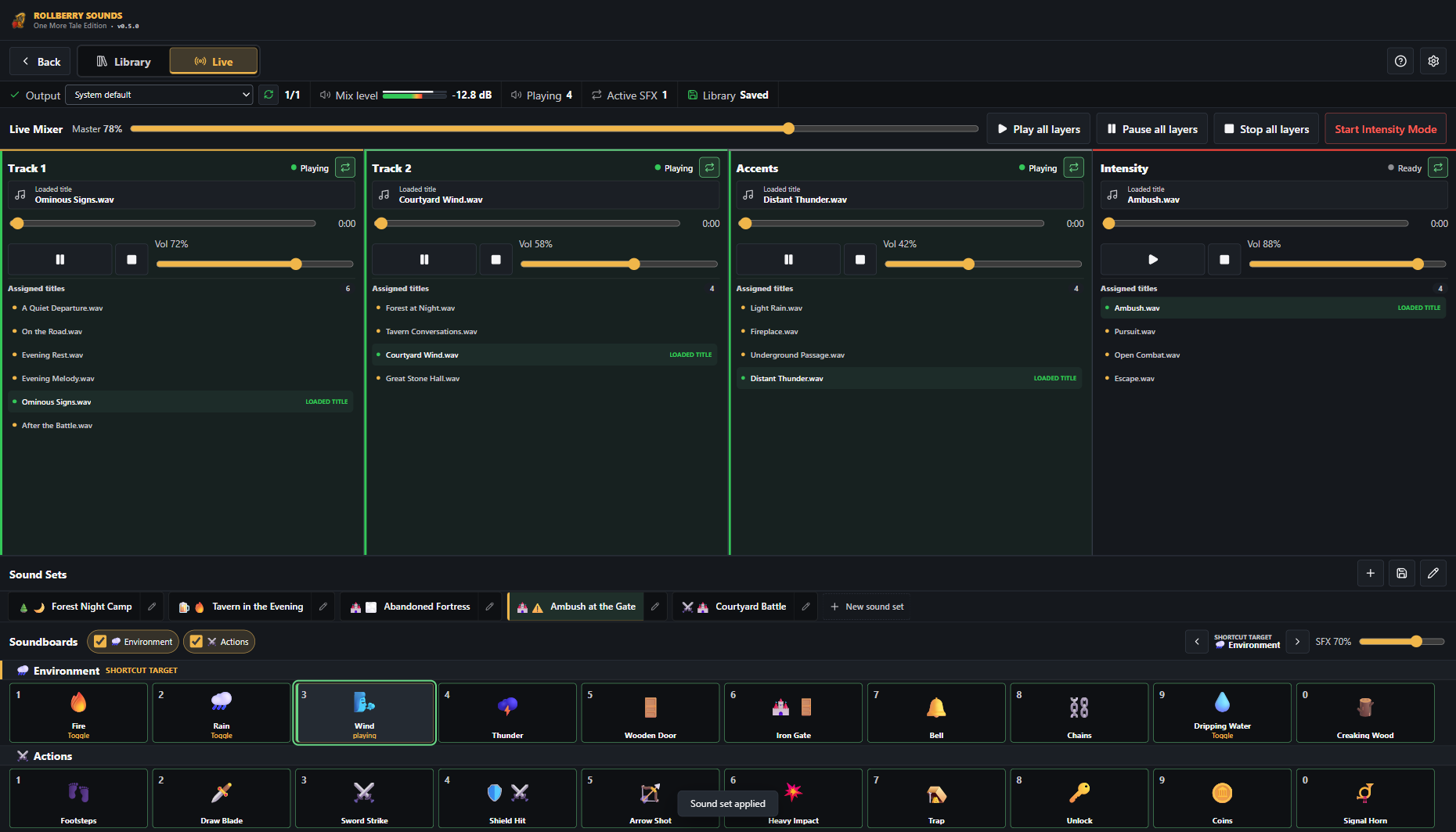
From folder to live moment
Collections, favourites, search, durations, and direct layer assignment keep even large personal libraries manageable.
Preview titles, volume, loops, and the intensity layer individually or as a complete mix.
Play, pause, resume, and seek layers while intensity and SFX remain within reach without switching windows.
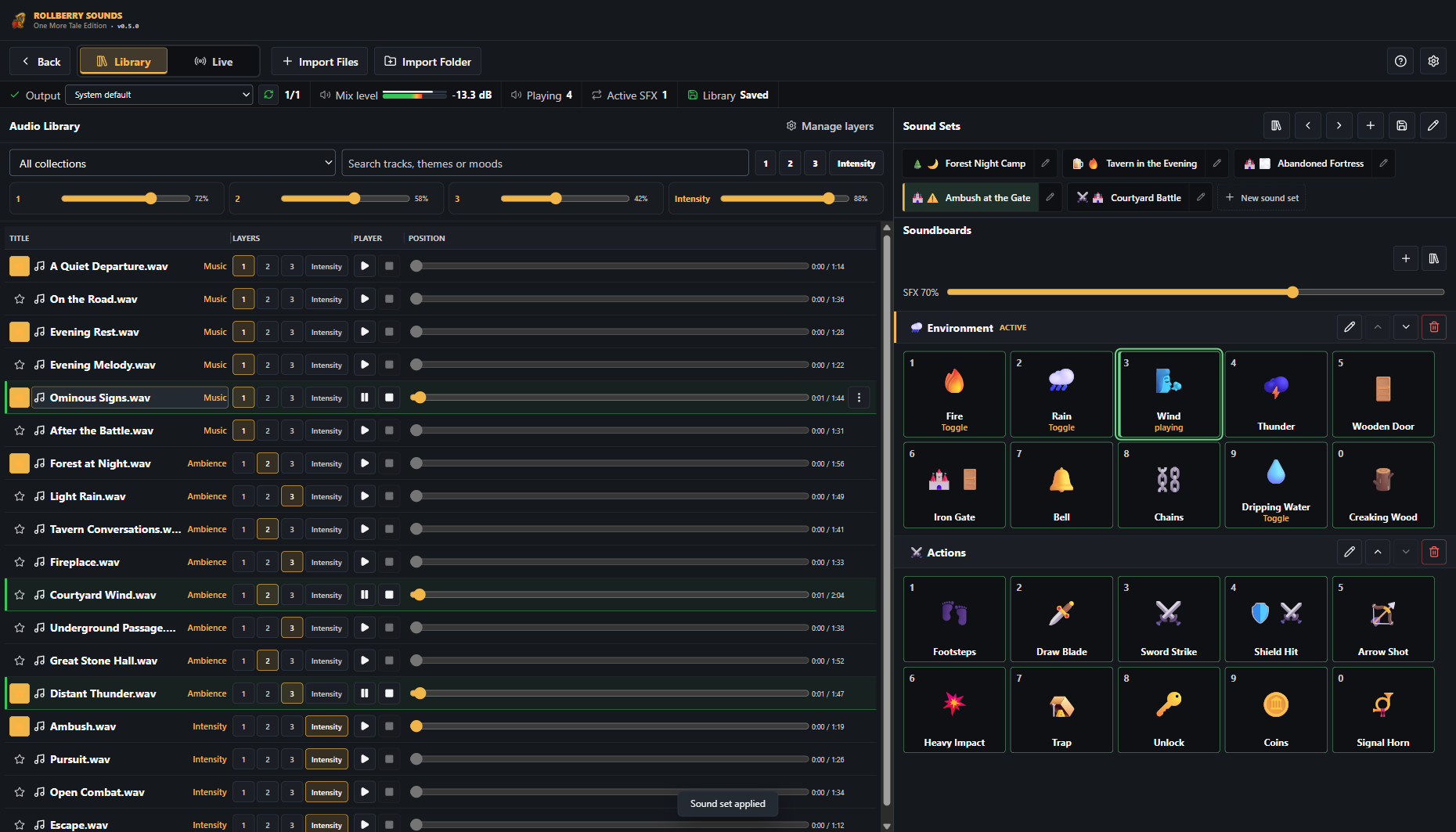
One row per title
Everyday actions avoid nested dropdowns: playback, progress, favourite, and layer assignment sit directly on the title. Context menus keep infrequent actions out of the main path.
Prepare before it matters
Choose title, active state, loop, and volume per layer. Preview one layer or the complete mix without overwriting live playback.
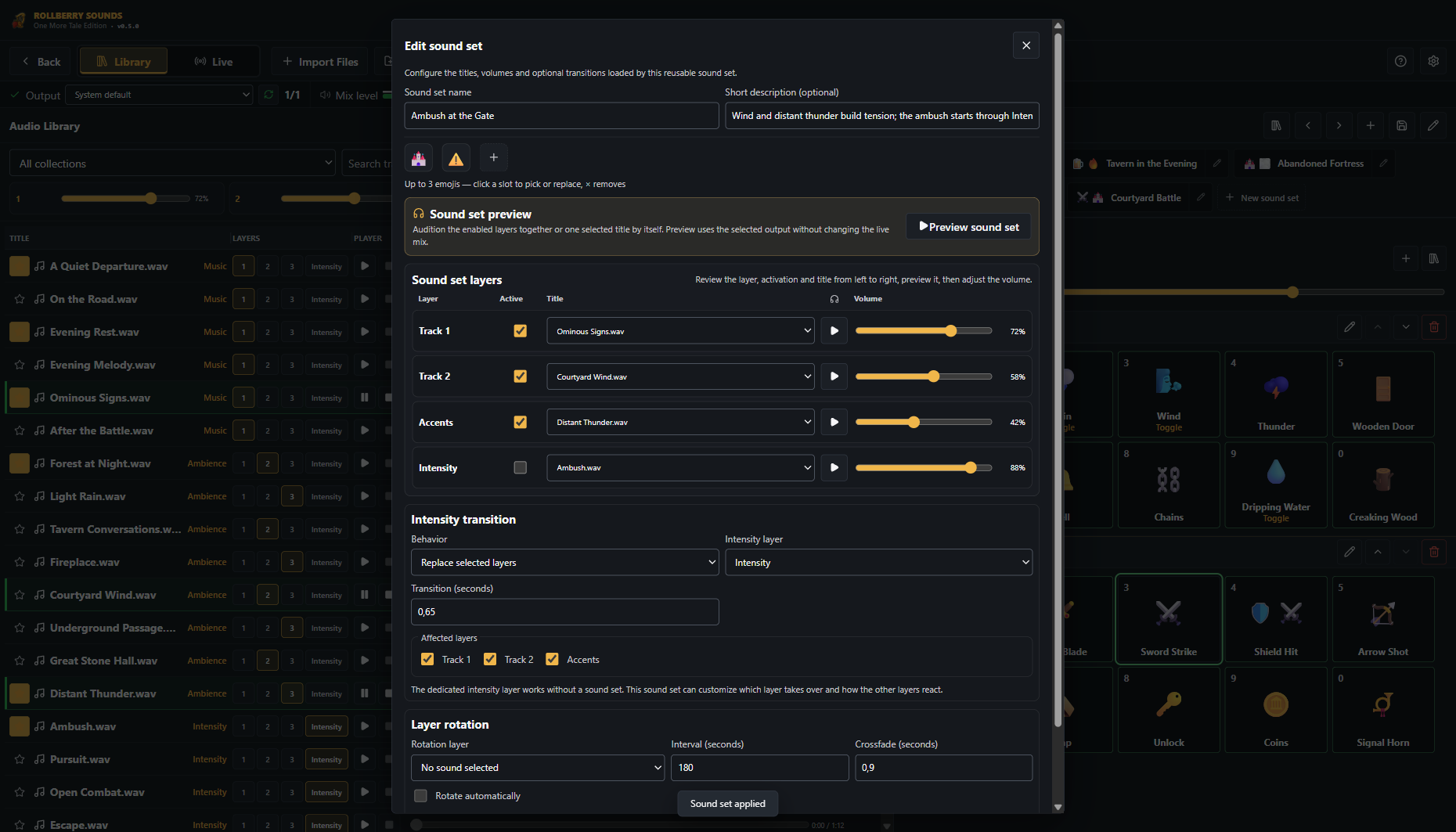
A prepared transition starts combat, pursuit, or escape and pauses selected base layers in a controlled way.
🌧️ Environment and ⚔️ Actions remain visible together; shortcuts cycle the active board.
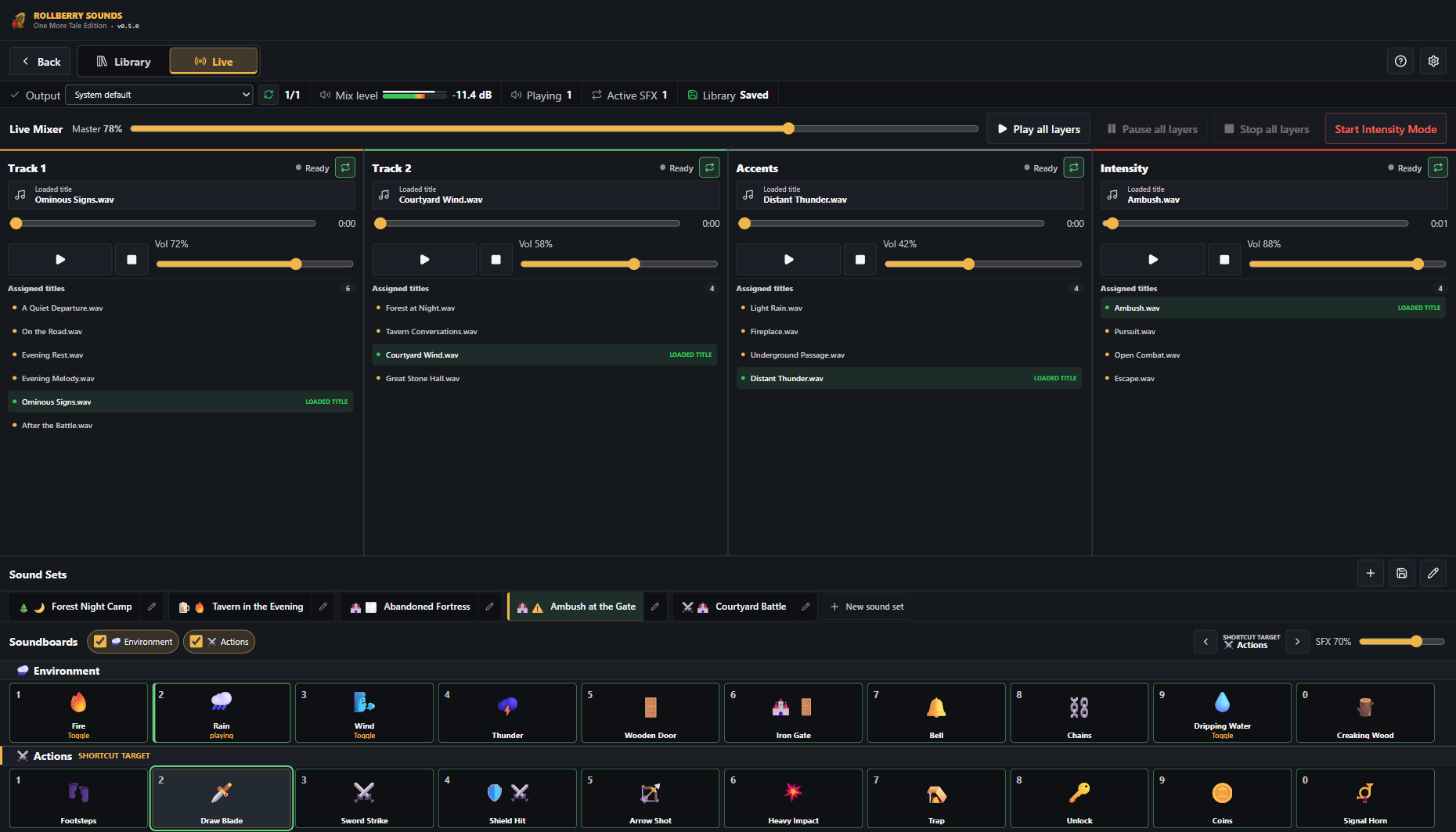
The displayed sample data was created solely for this demonstration and is not included with RollBerry Sounds.
Built for real sessions
Activate, name, order, and use tracks to match your setup.
No account, no cloud sync, and no bundled media.
Move your library, sound sets, and settings between installations with verified backups.
Play, pause, stop, progress, duration, and seekable position per title.
Manage local devices and existing virtual audio devices as separate targets.
Interface, help, and control terminology are available in both languages.
Download
Choose the edition for your system. All files are served directly from RollBerry's webspace.
Installer for regular use or a fully portable edition that requires no installation.
Separate packages for Intel-based Macs and Apple Silicon.
Universal AppImage or installable DEB package for amd64 systems.
Audio formats
Organise music, ambience, and sound effects from common audio files locally in one shared library.
No. RollBerry Sounds is the application for organising, preparing, and playing your own audio files.
Yes. The library, sound sets, soundboards, and settings remain local. Normal use does not require an account.
The installer is the recommended Windows edition. Portable stores its complete profile beside the EXE and is an optional mobile edition. Profile transfer moves data both ways; external media must not be disconnected while the app is running.
RollBerry Sounds can use existing virtual audio devices as output profiles. Configure the desired routing in the operating system, OBS, or Discord. Connection quality and availability depend on the third-party software and its configuration.
Part of RollBerry Studios

The problem
Musik in einem Tab, Ambience im nächsten, der Kampf-Track irgendwo dazwischen – und der falsche läuft im entscheidenden Moment. BardBerry bündelt Musik, Ambience und Kampf in einem Cockpit, das du blind bedienst.

Three steps at the table
Recall saved soundscapes with one click - tavern, forest, siege.
Music, ambience, and combat run separately - balance each layer while keeping the master in view.
Combat mode startet den passenden Track; ein Soundboard feuert Effekte im richtigen Moment.

Drei Ebenen, Master-Regler, nahtloser Wechsel in den Kampf.
Kanäle und Soundboard als wiederverwendbare Szene speichern.
Schnelle lokale SFX-Slots für Türen, Donner, Alarm.

What you can do with it
Musik, Ambience und Kampf als eigene Kanäle mit Loop und Lautstärke pro Ebene.
Combat mode übernimmt den Track als Override – ohne die Ambience zu verlieren.
Recall prepared soundscapes for each location or encounter - prep pays off at the table.
Directly from the RollBerry webspace. No account.
Du nutzt deine eigenen Audiodateien. BardBerry organisiert sie in Ebenen, Szenen und Soundboards.
Ja. Speicher Kanäle und Soundboard als Szene und ruf sie am Tisch mit einem Klick ab.
Ja. Deine Sounds liegen lokal, es braucht kein Streaming und keinen Account.
Part of RollBerry
The vision
Karten, Token, Fog, Initiative, Audio und Kampagnenwissen zusammen in einer Desktop-App. RollBerry verbindet die Kartensteuerung aus MapBerry und den Audio-Workflow aus RollBerry Sounds mit Kampagnenwissen – gebaut für Kontrolle am echten Tisch, ohne Cloud.
Projekteigene Testaufnahme ohne fremdes Karten-Artwork.
Everything in one window
Run combat directly on the map: place tokens, track order, keep conditions visible.
A clean player view for the second screen - like MapBerry, only integrated.
Notes, NPCs, and handouts in the same window as map and combat.
Eigene App-Aufnahme ohne fremdes Karten- oder Figuren-Artwork.
The path there
MapBerry und RollBerry Sounds decken Karten und Audio als eigenständige tools ab. RollBerry bringt diese Bereiche zusammen mit Kampagnenwissen Schritt für Schritt in ein gemeinsames Fenster.
{{ t.product_updates_eyebrow }}
{{ t.product_updates_body }}
{{ r.summary }}
Until then: start with the individual apps and send feedback that flows directly into the core.
RollBerry did not begin with the wish for another VTT. It began with the wish to protect a shared night—and make technology good enough to fade into the background again.
Because things happen at a real table that no video call can capture. The small grin before someone voices a foolish idea. Everyone holding their breath while the die is still rolling. A hand reaching for the bowl of chips while the group quietly makes a plan.
Online sessions have their place. RollBerry deliberately serves a different moment: people sharing a room, reading faces, laughing together, and living through a story that should not be interrupted by connection issues, logins, or browser windows.
That night matters to me.
That is why the technology should support it, not replace it: the map on the projector, fog with one click, the right track for the right scene—and then the tool fades into the background again. No login, no cloud, no “Who cannot hear me?”. Just your group, the table, and the story.
That is exactly what RollBerry is made for. Local, because your table belongs to you—not to a server.
A personal motivation becomes clear decisions about what the product should be—and what it deliberately should not become.
People and their story remain at the center. RollBerry carries work without demanding attention for itself.
Powerful does not mean overloaded. Tools appear where they make a decision faster and safer.
Campaigns are long-term creative work. Data and media stay local, understandable, recoverable, and under your control.
A feature is only finished when it holds up with large maps, many tokens, and time pressure at a real table.
RollBerry does not need to copy every feature from other VTTs. It needs to be better in the workflows that matter during a real session.
I am not building RollBerry to check as many boxes as possible on a comparison table. I am building it so technology can carry a great game night—calmly, reliably, and under the game master's control.
About RollBerry
RollBerry ist ein Indie-Projekt. Es entsteht neben dem eigenen Spieltisch, weil dort immer wieder dieselben kleinen Reibungen auftauchten: der Beamer, der zu viel zeigt. Der Sound, der im falschen Moment stockt. Der NSC-Name, der partout nicht auffindbar war. tools, die den Abend stören statt ihn zu tragen.
There are great online VTTs, but they are built for online play. At a real table you do not want to set up a platform, log players in, or maintain a server. RollBerry fills that gap: digital support that stays in the background.
Your campaign is valuable. It does not belong in a third-party cloud that can change prices or shut down tomorrow. Everything runs locally on your machine - no account, no dependency, no data ending up somewhere you do not control.
The best part of the hobby is the moment everyone sits at the same table. RollBerry does not want to replace that moment; it protects it. The tech serves the night, not the other way around.
Priority goes to what is actually needed at the table. Features come from real play and feedback, not from a list that wants to be as long as possible. As a solo/indie project, that means honest beta states, visible progress, and open communication about what does not work yet.
Apps in the ecosystem
local & account-free
forced cloud
Bugs, wishes, table experiences - everything flows directly into the next builds. Instagram or email are the easiest routes.
Contact & feedback
Bugs, wishes, and experiences from real sessions are all welcome and feed directly into upcoming builds. Choose the route that feels easiest.
Most helpful: which app and version, what you did, and what happened. That gets your report into the next build - by email to kontakt@rollberry.de.
RollBerry Studios · Philip Dietrich · Lehrter Straße 9, 30559 Hanover · +49 151 25395757